Lolly Sweety Font Review: A Whimsical Script for Creative Branding
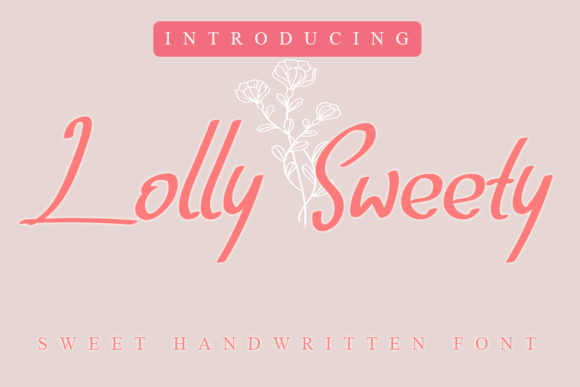
I was recently tasked with designing a brand identity for a local café that prides itself on being a cozy, artisanal spot in the neighborhood. The owner wanted something warm, approachable, and just a little bit charming to reflect their vibe. When I opened my font library, Lolly Sweety immediately caught my eye. As a Script Handwritten typeface, it’s got that personal touch that can’t be replicated by more rigid typography — and as any designer knows, that kind of character is gold when you’re trying to craft a story through design.
Lolly Sweety in Logo Design: Adding Personality Without Overdoing It
For the café logo, I needed something that felt hand-drawn but still clean enough for signage and digital use. Lolly Sweety fit the bill perfectly. Its relaxed curves and flowing strokes gave the logo a sense of warmth and familiarity, which is exactly what the client was going for. Compared to other script fonts I’ve used — like some of the more ornate or cursive-heavy options — Lolly Sweety feels lighter and less cluttered. That makes it ideal for a logo design project where legibility at a glance is key.
I tested it at different sizes and found that it holds up well in large formats, such as shop signs or headers on packaging. But I also noticed that it doesn’t scale down gracefully for small print or body text. So if you're using it for a logo, stick to short names or taglines and pair it with a stronger supporting font.
Using Lolly Sweety in Brand Identity Projects
After nailing the logo, I moved on to the rest of the brand identity. One of the first things I did was create a brand board using Lolly Sweety for the title and a few key phrases. The whimsy of the font helped set the tone right away. It worked especially well when paired with a soft sans serif for subheadings and body copy. This combination created a balanced look that felt both modern and nostalgic.
- Logo drafts: Great for expressive titles and taglines.
- Brand boards: Adds charm and personality to visual mood sets.
- Business cards: Looks lovely in short phrases and calligraphy-style accents.
What stood out was how Lolly Sweety could subtly shift the perception of the brand. With its delicate loops and gentle slant, it communicated a sense of care and craftsmanship — perfect for a boutique or lifestyle brand. However, I wouldn’t recommend using it for anything too formal or corporate. It's more suited to creative industries, from handmade shops to wellness brands, where a softer aesthetic is appropriate.
Lolly Sweety in Packaging and Product Labels
Next up was the packaging mockup. The café sells their own baked goods and coffee blends, so the labels needed to stand out while feeling authentic. I placed Lolly Sweety on the front of a reusable bag and a coffee sleeve. The result? Instantly recognizable and inviting. The font didn’t overwhelm the layout, yet it added a level of sophistication that felt intentional.
On product labels, I found that Lolly Sweety shines when used sparingly. For instance, using it for the name of the product and a tagline, while keeping ingredients or descriptions in a more readable font, kept the design from becoming cluttered. In one test, I tried using it for the entire label — and while it looked beautiful, the readability suffered. So remember, use Lolly Sweety as an accent rather than a full-text solution, especially in packaging design projects where clarity is crucial.
Lolly Sweety on Social Media and Web Headers
Social media is where this font really comes into its own. I used Lolly Sweety in an Instagram post header for the café’s new seasonal menu launch. The playful yet elegant style made the post feel curated and personal, which resonated with the target audience. I even layered it with a minimalist sans serif in the caption area, which created a nice contrast and helped guide the viewer’s eye.
In web design, I applied it to the homepage hero section. At larger sizes, it adds a welcoming touch without being distracting. It works best in short bursts — think headlines, buttons, or call-to-action phrases. If you're considering using Lolly Sweety for web design, make sure to test it across devices and screen resolutions. It’s a display font, not a body font, so keep that in mind for long-form content.
Font Pairing Tips with Lolly Sweety
One of the most important aspects of using Lolly Sweety effectively is knowing how to pair it with complementary Fonts. Here are a few combinations I’ve found useful:
- With a serif font: Ideal for adding a classic, refined contrast to the whimsy of Lolly Sweety. Try pairing it with something like Merriweather or Playfair Display for editorial layouts or packaging tags.
- With a sans serif font: Works great for creating a fresh, modern brand system. I often go with a clean sans like Montserrat or Open Sans for secondary text in brand systems using Lolly Sweety.
- With another script font: Avoid it unless you're aiming for a very specific, layered look. Lolly Sweety is unique enough to stand alone as the primary script font in your design.
Remember, when using a Script Handwritten font like Lolly Sweety, balance is everything. Too much of it can muddy the message, especially in dense layouts.
Real-World Observations and Limitations
During the project, I had a few moments where I second-guessed using Lolly Sweety. For example, when designing a poster that included several lines of text, the font began to feel a bit too casual and hard to read in longer form. I switched back to a more structured typeface for the main body, then used Lolly Sweety only for the headline and a signature line. That decision maintained the charm while ensuring the message was clear.
Another limitation became apparent when I tried using it for a product catalog. Even though it has a lovely style, it’s not built for long passages of text. Stick to short phrase uses, like slogans, product names, or greeting card sentiments. It’s a decorative font at heart, and that’s where it performs best.
Testing Lolly Sweety Before Committing to Client Work
If you're thinking about using Lolly Sweety in your next project, I recommend testing it in real-world scenarios before finalizing anything. Download the free version (if available) and try it out in a logo draft, a social media layout, or a brand board. See how it behaves at different sizes and in various color contrasts. Ask yourself: does it enhance the brand story, or does it distract?
You can also test it alongside potential partner fonts to see how it interacts. Keep in mind that because it's a handwritten font, there might be slight inconsistencies in spacing or weight — these are part of the charm, but they can affect alignment if you're not careful.
Commercial Use and Licensing Considerations
Before jumping into a paid project, always check the commercial font licensing terms for Lolly Sweety. If you're planning to use it in branding assets, web design, or merchandise, ensure the license supports those uses. Many premium fonts offer extended licenses for use in logos, packaging, and templates — but it’s easy to overlook this detail when you're deep into the design process.
As a professional, I always make it a point to confirm whether the font is suitable for print-on-demand platforms, websites, or mass-produced materials. Some Fonts have restrictions based on usage scope, so it’s worth investing in a proper commercial license if you plan to deploy it beyond personal work.
Why Lolly Sweety Deserves a Spot in Your Font Library
At the end of the day, Lolly Sweety isn’t just another pretty face in your Fonts collection — it’s a versatile tool that can elevate the right kinds of projects. Whether you're working on a bakery’s branding, a creative studio’s website, or a small business’s packaging, this Script Handwritten font brings a sense of authenticity and artistry that many designers crave.
It’s not a universal solution, but for the right use cases — like wedding invitations, product labels, or social media headers — it’s incredibly effective. I’ve found myself reaching for it again and again when I need a font that feels human, not machine-made. And let’s be honest, in today’s world of sterile digital aesthetics, that’s a rare and valuable quality.
If you're looking for a creative font that can add a dash of elegance to your designs without sacrificing style, Lolly Sweety is definitely worth a closer look. Just make sure to use it wisely and pair it thoughtfully. It’s not for every project, but for the ones it fits, it can truly shine.